Creating ZUGFeRD e-invoices via API: a tutorial with RechnungsAPI
Since 2025-01-01, e-invoicing under § 14 UStG has been the standard for transactions between domestic German businesses: every business must be able to receive e-invoices, while transition periods until the end of 2026 or 2027 apply to issuing them (§ 27(38) UStG). ZUGFeRD is particularly attractive for this because it combines an ordinary PDF invoice with structured XML data – recipients without e-invoicing software simply open the PDF.
This tutorial shows step by step how to create ZUGFeRD invoices with RechnungsAPI, without dealing with XML and PDF/A-3.
What is ZUGFeRD?
ZUGFeRD is the hybrid e-invoice format of the Forum elektronische Rechnung Deutschland (FeRD): a PDF/A-3 file with an embedded XML invoice in the UN/CEFACT CII format. It is technically identical to the French standard Factur-X. The German Federal Ministry of Finance's guidance on mandatory e-invoicing recognizes ZUGFeRD from version 2.0.1 as a permissible format – with the exception of the MINIMUM and BASIC WL profiles. Our article ZUGFeRD for developers explains the technical details.
The problem with native CII/XML
If you implement ZUGFeRD yourself, you have to generate CII XML and embed it into a PDF/A-3 in a standards-compliant way. Even a simple address is deeply nested in CII:
<ram:PostalTradeAddress>
    <ram:LineOne>Musterstraße 55a</ram:LineOne>
    <ram:CityName>Hamburg</ram:CityName>
    <ram:PostcodeCode>12345</ram:PostcodeCode>
    <ram:CountryID>DE</ram:CountryID>
</ram:PostalTradeAddress>
The same address in RechnungsAPI:
{
  "address": {
    "line1": "Musterstraße 55a",
    "postalCode": "12345",
    "city": "Hamburg",
    "country": "DE"
  }
}
A single invoice line in CII:
<ram:IncludedSupplyChainTradeLineItem>
    <ram:AssociatedDocumentLineDocument>
        <ram:LineID>1</ram:LineID>
    </ram:AssociatedDocumentLineDocument>
    <ram:SpecifiedTradeProduct>
        <ram:Name>Beratung und Konzeption</ram:Name>
        <ram:Description>Analyse und Erarbeitung eines Konzepts</ram:Description>
    </ram:SpecifiedTradeProduct>
    <ram:SpecifiedLineTradeAgreement>
        <ram:NetPriceProductTradePrice>
            <ram:ChargeAmount>95.00</ram:ChargeAmount>
        </ram:NetPriceProductTradePrice>
    </ram:SpecifiedLineTradeAgreement>
    <ram:SpecifiedLineTradeDelivery>
        <ram:BilledQuantity unitCode="HUR">3</ram:BilledQuantity>
    </ram:SpecifiedLineTradeDelivery>
    <ram:SpecifiedLineTradeSettlement>
        <ram:ApplicableTradeTax>
            <ram:TypeCode>VAT</ram:TypeCode>
            <ram:CategoryCode>S</ram:CategoryCode>
            <ram:RateApplicablePercent>19.00</ram:RateApplicablePercent>
        </ram:ApplicableTradeTax>
        <ram:SpecifiedTradeSettlementLineMonetarySummation>
            <ram:LineTotalAmount>285.00</ram:LineTotalAmount>
        </ram:SpecifiedTradeSettlementLineMonetarySummation>
    </ram:SpecifiedLineTradeSettlement>
</ram:IncludedSupplyChainTradeLineItem>
The same information in the RechnungsAPI format:
{
  "unitPrice": { "value": "95.00", "currency": "EUR" },
  "quantity": { "value": "3", "unit": "HUR" },
  "item": {
    "name": "Beratung und Konzeption",
    "description": "Analyse und Erarbeitung eines Konzepts",
    "vat": { "code": "S", "rate": "19.00" }
  }
}
On top of that, ZUGFeRD adds the PDF side: PDF/A-3 conformance, embedded fonts and XMP metadata. RechnungsAPI produces both – the CII XML and the compliant PDF – from a single JSON request.
Setup and installation
The examples use the official Node.js SDK. Since RechnungsAPI is a REST API with an OpenAPI specification, the same calls work from any programming language, including generated OpenAPI clients.
npm install @rechnungs-api/client
Client initialization
You receive your API key after registering at rechnungs-api.de. Test keys start with test_, production keys with prod_.
import { Client } from "@rechnungs-api/client";

export const client = new Client({
  apiKey: process.env.RECHNUNGS_API_KEY || "YOUR_API_KEY",
});
Step by step to a ZUGFeRD invoice
Step 1: Define the sender
import type { SenderParty } from "@rechnungs-api/client";

const sender: SenderParty = {
  name: "Muster GmbH",
  address: {
    line1: "Musterstraße 55a",
    postalCode: "12345",
    city: "Hamburg",
    country: "DE",
  },
  electronicAddress: {
    scheme: "EM",
    value: "info@example.com",
  },
  contact: {
    name: "Max Mustermann",
    email: "max.mustermann@example.com",
    phone: "+49123456789",
  },
  vatId: "DE123456789", // VAT ID
  taxId: "12/345/67890", // German tax number
  owner: "Max Mustermann", // Owner or managing director
  registration: {
    office: "Amtsgericht Hamburg",
    number: "HRB 123456",
  },
};
vatId: The VAT identification number (in Germany "DE" + 9 digits).taxId: Alternatively or additionally, the tax number issued by the tax office.registration/owner: Commercial register entry and authorized representative – they appear on the PDF rendering.
Step 2: Define the recipient
import type { RecipientParty } from "@rechnungs-api/client";

const recipient: RecipientParty = {
  name: "Beispiel UG (haftungsbeschränkt)",
  address: {
    line1: "Musterweg 3c",
    postalCode: "54321",
    city: "Berlin",
    country: "DE",
  },
  electronicAddress: {
    scheme: "EM",
    value: "buchhaltung@beispiel-ug.de",
  },
  contact: {
    name: "Erika Musterfrau",
    email: "erika.musterfrau@beispiel-ug.de",
    phone: "+49987654321",
  },
  vatId: "DE987654321",
};
The electronicAddress follows the EAS code list; EM (email address) is common in B2B. German authorities are addressed via their Leitweg-ID with the code 0204.
Step 3: Set the payment information
import type { PaymentInformation } from "@rechnungs-api/client";

const payment: PaymentInformation = {
  means: [{
    code: "58", // SEPA credit transfer
    bankAccount: {
      bankName: "Muster Bank",
      iban: "DE12345678901234567890",
      bic: "MUSTDE12XXX",
    },
  }],
  terms: "Zahlbar innerhalb von 30 Tagen netto",
};
The payment means follows the UNTDID 4461 code list. The most important codes:
58– SEPA credit transfer30– Credit transfer (generic)59– SEPA direct debit48– Bank card10– In cash
Step 4: Create the invoice lines
import type { DocumentLineCreateRequest } from "@rechnungs-api/client";

const lines: DocumentLineCreateRequest[] = [
  {
    unitPrice: { value: "95.00", currency: "EUR" },
    item: {
      name: "Beratung und Konzeption",
      description: "Analyse und Erarbeitung eines Konzepts für die Digitalisierung",
      vat: { code: "S", rate: "19.00" },
    },
    quantity: { value: "3", unit: "HUR" }, // HUR = hour
  },
  {
    unitPrice: { value: "500.00", currency: "EUR" },
    item: {
      name: "Logo-Design",
      description: "Entwicklung eines Corporate Designs inkl. Logo",
      vat: { code: "S", rate: "19.00" },
    },
    quantity: { value: "1", unit: "H87" }, // H87 = piece
  },
];
Unit codes come from UN/ECE Recommendation N°20 and N°21, for example:
H87= piece,C62= the unit "one"HUR= hour,DAY= dayKGM= kilogram,MTR= metre,MTK= square metre,LTR= litre
VAT categories follow the UNTDID 5305 code list:
S= standard rate – applies to every rate above 0 %, i.e. both 19 % and the reduced German rate of 7 % (each with the matchingrate)Z= tax rate 0 %E= exempt from tax; an exemption reason is required, e.g. for small businesses under § 19 UStGAE= reverse charge (§ 13b UStG)K= intra-community supply,G= export,O= outside the scope of tax
Step 5: ZUGFeRD configuration
import type { EInvoiceConfiguration } from "@rechnungs-api/client";

const eInvoiceConfig: EInvoiceConfiguration = {
  type: "zugferd",
  profile: "en-16931", // 'minimum' | 'basic-wl' | 'basic' | 'en-16931' | 'extended' | 'xrechnung'
};
The available ZUGFeRD profiles:
minimumandbasic-wl: only bookkeeping aids – not recognized as e-invoices under § 14 UStG in Germanybasic: basic data including invoice linesen-16931: the complete EN 16931 data model – the right choice for most B2B casesextended: extended fields for complex scenariosxrechnung: additionally satisfies the German XRechnung business rules; maximum compatibility, including for public-sector customers
Recommendation: en-16931 for the standard B2B case, or xrechnung for maximum compatibility.
Step 6: Assemble the complete invoice
import type { DocumentCreateRequest } from "@rechnungs-api/client";

const documentRequest: DocumentCreateRequest = {
  type: "invoice",
  locale: "de-DE",
  number: "RE-2026-001",
  issueDate: "2026-06-15",
  dueDate: "2026-07-15",

  sender,
  recipient,
  payment,
  lines,

  // Enable ZUGFeRD
  eInvoice: eInvoiceConfig,

  // Buyer reference, e.g. an order or project number
  buyerReference: "PROJEKT-2026-ZF",

  // Texts for the PDF rendering
  preTableText: "Sehr geehrte Damen und Herren,\n\nfür die erbrachten Leistungen stellen wir Ihnen folgende Positionen in Rechnung:",
  postTableText: "Vielen Dank für Ihren Auftrag! Bitte überweisen Sie den Betrag bis zum Fälligkeitsdatum auf das angegebene Konto.",

  // Optional: styling of the PDF
  theme: {
    fontFamily: "Open Sans",
  },
};
A note on the xrechnung profile: it requires a buyer reference (buyerReference). If no meaningful reference exists, a placeholder such as "00" can be used in practice.
Step 7: Create and download the ZUGFeRD invoice
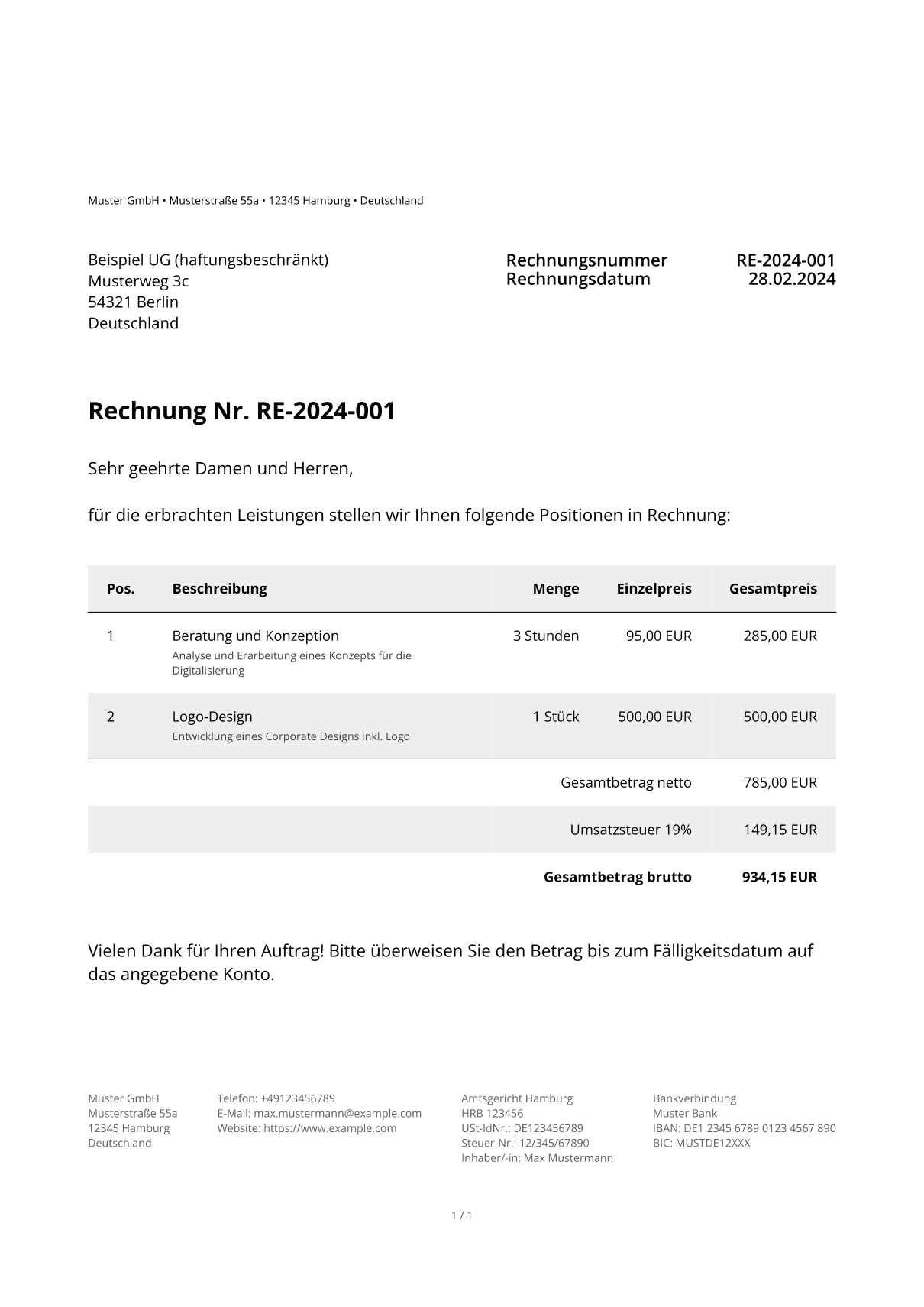
The result is a PDF file that invisibly contains the structured XML data:
import * as fs from "node:fs/promises";

const document = await client.createDocument(documentRequest);
console.log(`ZUGFeRD invoice created! ID: ${document.id}`);

// Download the ZUGFeRD PDF (contains the embedded XML)
const pdf = await client.readDocument(document.id, "pdf");
await fs.writeFile("zugferd-rechnung.pdf", Buffer.from(pdf));
The resulting PDF looks like this:
Complete working example
import * as fs from "node:fs/promises";
import type {
  DocumentCreateRequest,
  RecipientParty,
  SenderParty,
} from "@rechnungs-api/client";
import { Client } from "@rechnungs-api/client";

const client = new Client({
  apiKey: process.env.RECHNUNGS_API_KEY || "YOUR_API_KEY",
});

const sender: SenderParty = {
  name: "Muster GmbH",
  address: {
    line1: "Musterstraße 55a",
    postalCode: "12345",
    city: "Hamburg",
    country: "DE",
  },
  electronicAddress: {
    scheme: "EM",
    value: "info@example.com",
  },
  contact: {
    name: "Max Mustermann",
    email: "max.mustermann@example.com",
    phone: "+49123456789",
  },
  vatId: "DE123456789",
  taxId: "12/345/67890",
  owner: "Max Mustermann",
  registration: {
    office: "Amtsgericht Hamburg",
    number: "HRB 123456",
  },
};

const recipient: RecipientParty = {
  name: "Beispiel UG (haftungsbeschränkt)",
  address: {
    line1: "Musterweg 3c",
    postalCode: "54321",
    city: "Berlin",
    country: "DE",
  },
  electronicAddress: {
    scheme: "EM",
    value: "buchhaltung@beispiel-ug.de",
  },
  contact: {
    name: "Erika Musterfrau",
    email: "erika.musterfrau@beispiel-ug.de",
    phone: "+49987654321",
  },
  vatId: "DE987654321",
};

const documentRequest: DocumentCreateRequest = {
  type: "invoice",
  locale: "de-DE",
  number: "RE-2026-001",
  issueDate: "2026-06-15",
  dueDate: "2026-07-15",

  sender,
  recipient,
  buyerReference: "PROJEKT-2026-ZF",

  preTableText: "Sehr geehrte Damen und Herren,\n\nfür die erbrachten Leistungen stellen wir Ihnen folgende Positionen in Rechnung:",
  postTableText: "Vielen Dank für Ihren Auftrag! Bitte überweisen Sie den Betrag bis zum Fälligkeitsdatum auf das angegebene Konto.",

  lines: [
    {
      unitPrice: { value: "95.00", currency: "EUR" },
      item: {
        name: "Beratung und Konzeption",
        description: "Analyse und Erarbeitung eines Konzepts für die Digitalisierung",
        vat: { code: "S", rate: "19.00" },
      },
      quantity: { value: "3", unit: "HUR" },
    },
    {
      unitPrice: { value: "500.00", currency: "EUR" },
      item: {
        name: "Logo-Design",
        description: "Entwicklung eines Corporate Designs inkl. Logo",
        vat: { code: "S", rate: "19.00" },
      },
      quantity: { value: "1", unit: "H87" },
    },
  ],

  payment: {
    means: [{
      code: "58",
      bankAccount: {
        bankName: "Muster Bank",
        iban: "DE12345678901234567890",
        bic: "MUSTDE12XXX",
      },
    }],
    terms: "Zahlbar innerhalb von 30 Tagen netto",
  },

  eInvoice: {
    type: "zugferd",
    profile: "en-16931",
  },

  theme: {
    fontFamily: "Open Sans",
  },
};

async function main() {
  const document = await client.createDocument(documentRequest);
  console.log(`ZUGFeRD invoice created! ID: ${document.id}`);

  const pdf = await client.readDocument(document.id, "pdf");
  await fs.writeFile("zugferd-rechnung.pdf", Buffer.from(pdf));

  console.log(`Number: ${document.number}`);
  console.log(`Net amount: ${document.netAmount.value} ${document.netAmount.currency}`);
  console.log(`Gross amount: ${document.grossAmount.value} ${document.grossAmount.currency}`);
}

main();
Advanced features
Delivery address and delivery period
const documentRequest: DocumentCreateRequest = {
  // ... other fields
  delivery: {
    address: {
      line1: "Lieferstraße 10",
      postalCode: "98765",
      city: "München",
      country: "DE",
    },
  },
  deliveryPeriod: {
    startDate: "2026-06-01",
    endDate: "2026-06-30",
    vatDate: "35",
  },
};
The optional vatDate field states when the VAT becomes chargeable. The subset of the UNTDID 2005 code list prescribed by EN 16931 is permitted: 3 (invoice date), 35 (delivery date) or 432 (payment).
Embedding a logo
import * as fs from "node:fs/promises";

const logoBuffer = await fs.readFile("./company-logo.png");
const logoBase64 = logoBuffer.toString("base64");

const documentRequest: DocumentCreateRequest = {
  // ... other fields
  theme: {
    logo: `data:image/png;base64,${logoBase64}`,
    fontFamily: "Open Sans",
  },
};
Error handling
import { ApiError } from "@rechnungs-api/client";

try {
  const document = await client.createDocument(documentRequest);
  // ...
} catch (error) {
  if (error instanceof ApiError) {
    console.error(`API error [${error.status}]:`, error.body);
  }
  throw error;
}
Conclusion
With RechnungsAPI you create ZUGFeRD invoices through a JSON API – the service takes care of the CII XML, the PDF/A-3 embedding and the validation. You provide the invoice data, the API delivers a finished hybrid e-invoice.
You can find all the details and further features in the documentation, where you can also try the API directly.