Creating XRechnung invoices via API: a tutorial with RechnungsAPI
XRechnung is the German standard for electronic invoices to the public sector. Suppliers to the federal government have had to submit their invoices electronically since 2020-11-27 (§ 3 E-Rechnungsverordnung), and since 2025-01-01 e-invoicing under § 14 UStG has also been the standard between domestic businesses. If you integrate invoicing into your own software, this raises the question: how do you create compliant XRechnung invoices without implementing the XML specification in detail?
This tutorial shows step by step how to create XRechnung invoices with RechnungsAPI – no UBL knowledge required.
What is an XRechnung?
XRechnung is a national specialization (CIUS) of the European standard EN 16931 and is operated by KoSIT on behalf of the German IT Planning Council. An XRechnung is a structured XML document in either the UBL or the UN/CEFACT CII syntax. Our article XRechnung for developers explains the technical details.
The problem with native UBL/XML
A simple address requires a nested XML structure with namespace prefixes in UBL:
<cac:PostalAddress>
    <cbc:StreetName>Musterstraße 55a</cbc:StreetName>
    <cbc:CityName>Hamburg</cbc:CityName>
    <cbc:PostalZone>12345</cbc:PostalZone>
    <cac:Country>
        <cbc:IdentificationCode>DE</cbc:IdentificationCode>
    </cac:Country>
</cac:PostalAddress>
The same address in RechnungsAPI is plain JSON:
{
  "address": {
    "line1": "Musterstraße 55a",
    "postalCode": "12345",
    "city": "Hamburg",
    "country": "DE"
  }
}
With invoice lines the difference becomes even clearer. A single line in UBL:
<cac:InvoiceLine>
    <cbc:ID>1</cbc:ID>
    <cbc:InvoicedQuantity unitCode="HUR">3</cbc:InvoicedQuantity>
    <cbc:LineExtensionAmount currencyID="EUR">285.00</cbc:LineExtensionAmount>
    <cac:Item>
        <cbc:Name>Beratung und Konzeption</cbc:Name>
        <cbc:Description>Analyse und Erarbeitung eines Konzepts</cbc:Description>
        <cac:ClassifiedTaxCategory>
            <cbc:ID>S</cbc:ID>
            <cbc:Percent>19</cbc:Percent>
            <cac:TaxScheme>
                <cbc:ID>VAT</cbc:ID>
            </cac:TaxScheme>
        </cac:ClassifiedTaxCategory>
    </cac:Item>
    <cac:Price>
        <cbc:PriceAmount currencyID="EUR">95.00</cbc:PriceAmount>
    </cac:Price>
</cac:InvoiceLine>
The same information in the RechnungsAPI format:
{
  "unitPrice": { "value": "95.00", "currency": "EUR" },
  "quantity": { "value": "3", "unit": "HUR" },
  "item": {
    "name": "Beratung und Konzeption",
    "description": "Analyse und Erarbeitung eines Konzepts",
    "vat": { "code": "S", "rate": "19.00" }
  }
}
Line numbers, totals and the compliant UBL XML are generated by the API in the background – including validation.
Setup and installation
The examples use the official Node.js SDK. Since RechnungsAPI is a REST API with an OpenAPI specification, the same calls work from any programming language, including generated OpenAPI clients.
npm install @rechnungs-api/client
The SDK is fully typed in TypeScript.
Client initialization
You receive your API key after registering at rechnungs-api.de. Test keys start with test_, production keys with prod_.
import { Client } from "@rechnungs-api/client";

export const client = new Client({
  apiKey: process.env.RECHNUNGS_API_KEY || "YOUR_API_KEY",
});
Step by step to an XRechnung
Step 1: Define the sender
The sender is usually your own company:
import type { SenderParty } from "@rechnungs-api/client";

const sender: SenderParty = {
  name: "Muster GmbH",
  address: {
    line1: "Musterstraße 55a",
    postalCode: "12345",
    city: "Hamburg",
    country: "DE",
  },
  // Electronic address - required for XRechnung
  electronicAddress: {
    scheme: "EM", // EM = email
    value: "info@example.com",
  },
  contact: {
    name: "Max Mustermann",
    email: "max.mustermann@example.com",
    phone: "+49123456789",
  },
  vatId: "DE123456789", // VAT ID
  taxId: "12/345/67890", // German tax number
  owner: "Max Mustermann", // Owner or managing director
  registration: {
    office: "Amtsgericht Hamburg",
    number: "HRB 123456",
  },
};
The most important fields:
electronicAddress: The electronic address is required for e-invoices. The scheme code comes from the EAS code list;EMstands for an email address.vatId: The VAT identification number (in Germany "DE" + 9 digits).taxId: Alternatively or additionally, the tax number issued by the tax office.registration/owner: Commercial register entry and authorized representative – they appear on the PDF rendering of the invoice.
Step 2: Define the recipient
import type { RecipientParty } from "@rechnungs-api/client";

const recipient: RecipientParty = {
  name: "Beispiel UG (haftungsbeschränkt)",
  address: {
    line1: "Musterweg 3c",
    postalCode: "54321",
    city: "Berlin",
    country: "DE",
  },
  electronicAddress: {
    scheme: "EM",
    value: "buchhaltung@beispiel-ug.de",
  },
  contact: {
    name: "Erika Musterfrau",
    email: "erika.musterfrau@beispiel-ug.de",
    phone: "+49987654321",
  },
  vatId: "DE987654321",
};
Invoices to public authorities: German public-sector bodies are addressed via their Leitweg-ID. The EAS code list provides the code 0204 for this:
electronicAddress: {
  scheme: "0204", // EAS code for the German Leitweg-ID
  value: "991-12345-67890-12", // The authority's Leitweg-ID
}
The contracting authority provides you with the Leitweg-ID, usually when placing the order. It must also be specified as the buyer reference (buyerReference, see step 6).
Step 3: Set the payment information
import type { PaymentInformation } from "@rechnungs-api/client";

const payment: PaymentInformation = {
  means: [{
    code: "58", // SEPA credit transfer
    bankAccount: {
      bankName: "Muster Bank",
      iban: "DE12345678901234567890",
      bic: "MUSTDE12XXX",
    },
  }],
  terms: "Zahlbar innerhalb von 30 Tagen netto",
};
The payment means follows the UNTDID 4461 code list. The most important codes:
58– SEPA credit transfer30– Credit transfer (generic)59– SEPA direct debit48– Bank card10– In cash
Step 4: Create the invoice lines
import type { DocumentLineCreateRequest } from "@rechnungs-api/client";

const lines: DocumentLineCreateRequest[] = [
  {
    unitPrice: { value: "95.00", currency: "EUR" },
    item: {
      name: "Beratung und Konzeption",
      description: "Analyse und Erarbeitung eines Konzepts für die Digitalisierung",
      vat: { code: "S", rate: "19.00" },
    },
    quantity: { value: "3", unit: "HUR" }, // HUR = hour
  },
  {
    unitPrice: { value: "500.00", currency: "EUR" },
    item: {
      name: "Logo-Design",
      description: "Entwicklung eines Corporate Designs inkl. Logo",
      vat: { code: "S", rate: "19.00" },
    },
    quantity: { value: "1", unit: "H87" }, // H87 = piece
  },
];
Unit codes come from UN/ECE Recommendation N°20 and N°21, for example:
H87= piece,C62= the unit "one"HUR= hour,DAY= dayKGM= kilogram,MTR= metre,MTK= square metre,LTR= litre
VAT categories follow the UNTDID 5305 code list:
S= standard rate – applies to every rate above 0 %, i.e. both 19 % and the reduced German rate of 7 % (each with the matchingrate)Z= tax rate 0 %E= exempt from tax; an exemption reason is required, e.g. for small businesses under § 19 UStGAE= reverse charge (§ 13b UStG)K= intra-community supply,G= export,O= outside the scope of tax
Step 5: XRechnung configuration
The eInvoice field turns the invoice into an e-invoice:
import type { EInvoiceConfiguration } from "@rechnungs-api/client";

const eInvoiceConfig: EInvoiceConfiguration = {
  type: "xrechnung", // Alternatively "zugferd"
  syntax: "ubl", // Alternatively "cii"
  embedPdf: true, // Embed the PDF rendering into the XML
};
syntax: XRechnung permits the UBL and CII syntaxes; we recommendubl.embedPdf: RechnungsAPI also generates a human-readable PDF from the invoice data and can embed it into the XML as an attachment.
Step 6: Assemble the complete invoice
import type { DocumentCreateRequest } from "@rechnungs-api/client";

const documentRequest: DocumentCreateRequest = {
  type: "invoice", // Other document types like "self-billing-invoice" are possible too
  locale: "de-DE",
  number: "RE-2026-001",
  issueDate: "2026-06-15",
  dueDate: "2026-07-15",

  sender,
  recipient,
  payment,
  lines,

  // Enable XRechnung
  eInvoice: eInvoiceConfig,

  // Buyer reference (BT-10) - the Leitweg-ID when invoicing authorities
  buyerReference: "PROJEKT-2026-XR",

  // Texts for the PDF rendering
  preTableText: "Sehr geehrte Damen und Herren,\n\nfür die erbrachten Leistungen stellen wir Ihnen folgende Positionen in Rechnung:",
  postTableText: "Vielen Dank für Ihren Auftrag! Bitte überweisen Sie den Betrag bis zum Fälligkeitsdatum auf das angegebene Konto.",

  // Optional: styling of the PDF
  theme: {
    fontFamily: "Open Sans",
  },
};
buyerReference: A reference of the buyer, such as an order or project number. For invoices to German authorities, the Leitweg-ID goes here.issueDate/dueDate: Dates in the ISO formatYYYY-MM-DD.
Step 7: Create and download the invoice
import * as fs from "node:fs/promises";

const document = await client.createDocument(documentRequest);
console.log(`XRechnung created! ID: ${document.id}`);

// Download the XRechnung XML
const xml = await client.readDocument(document.id, "xml");
await fs.writeFile("xrechnung.xml", xml);
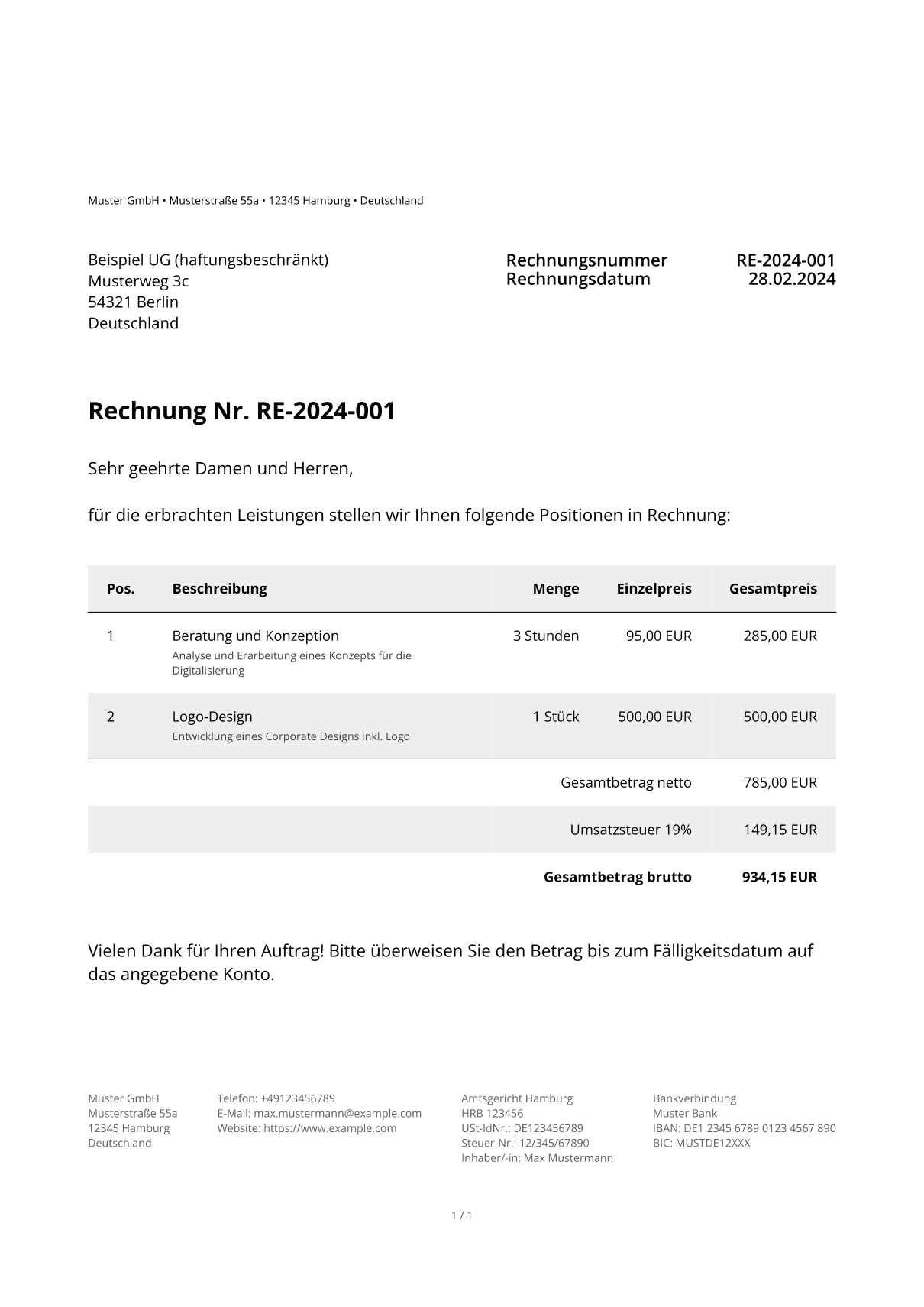
The PDF rendering embedded into the XML looks like this:
Complete working example
import * as fs from "node:fs/promises";
import type {
  DocumentCreateRequest,
  RecipientParty,
  SenderParty,
} from "@rechnungs-api/client";
import { Client } from "@rechnungs-api/client";

const client = new Client({
  apiKey: process.env.RECHNUNGS_API_KEY || "YOUR_API_KEY",
});

const sender: SenderParty = {
  name: "Muster GmbH",
  address: {
    line1: "Musterstraße 55a",
    postalCode: "12345",
    city: "Hamburg",
    country: "DE",
  },
  electronicAddress: {
    scheme: "EM",
    value: "info@example.com",
  },
  contact: {
    name: "Max Mustermann",
    email: "max.mustermann@example.com",
    phone: "+49123456789",
  },
  vatId: "DE123456789",
  taxId: "12/345/67890",
  owner: "Max Mustermann",
  registration: {
    office: "Amtsgericht Hamburg",
    number: "HRB 123456",
  },
};

const recipient: RecipientParty = {
  name: "Beispiel UG (haftungsbeschränkt)",
  address: {
    line1: "Musterweg 3c",
    postalCode: "54321",
    city: "Berlin",
    country: "DE",
  },
  electronicAddress: {
    scheme: "EM",
    value: "buchhaltung@beispiel-ug.de",
  },
  contact: {
    name: "Erika Musterfrau",
    email: "erika.musterfrau@beispiel-ug.de",
    phone: "+49987654321",
  },
  vatId: "DE987654321",
};

const documentRequest: DocumentCreateRequest = {
  type: "invoice",
  locale: "de-DE",
  number: "RE-2026-001",
  issueDate: "2026-06-15",
  dueDate: "2026-07-15",

  sender,
  recipient,
  buyerReference: "PROJEKT-2026-XR",

  preTableText: "Sehr geehrte Damen und Herren,\n\nfür die erbrachten Leistungen stellen wir Ihnen folgende Positionen in Rechnung:",
  postTableText: "Vielen Dank für Ihren Auftrag! Bitte überweisen Sie den Betrag bis zum Fälligkeitsdatum auf das angegebene Konto.",

  lines: [
    {
      unitPrice: { value: "95.00", currency: "EUR" },
      item: {
        name: "Beratung und Konzeption",
        description: "Analyse und Erarbeitung eines Konzepts für die Digitalisierung",
        vat: { code: "S", rate: "19.00" },
      },
      quantity: { value: "3", unit: "HUR" },
    },
    {
      unitPrice: { value: "500.00", currency: "EUR" },
      item: {
        name: "Logo-Design",
        description: "Entwicklung eines Corporate Designs inkl. Logo",
        vat: { code: "S", rate: "19.00" },
      },
      quantity: { value: "1", unit: "H87" },
    },
  ],

  payment: {
    means: [{
      code: "58",
      bankAccount: {
        bankName: "Muster Bank",
        iban: "DE12345678901234567890",
        bic: "MUSTDE12XXX",
      },
    }],
    terms: "Zahlbar innerhalb von 30 Tagen netto",
  },

  eInvoice: {
    type: "xrechnung",
    syntax: "ubl",
    embedPdf: true,
  },

  theme: {
    fontFamily: "Open Sans",
  },
};

async function main() {
  const document = await client.createDocument(documentRequest);
  console.log(`XRechnung created! ID: ${document.id}`);

  const xml = await client.readDocument(document.id, "xml");
  await fs.writeFile("xrechnung.xml", xml);

  console.log(`Number: ${document.number}`);
  console.log(`Net amount: ${document.netAmount.value} ${document.netAmount.currency}`);
  console.log(`Gross amount: ${document.grossAmount.value} ${document.grossAmount.currency}`);
}

main();
Advanced features
Adding a logo
import * as fs from "node:fs/promises";

const logoBuffer = await fs.readFile("./logo.png");
const logoBase64 = logoBuffer.toString("base64");

const documentRequest: DocumentCreateRequest = {
  // ... other fields
  theme: {
    logo: `data:image/png;base64,${logoBase64}`,
    fontFamily: "Open Sans",
  },
};
Delivery address and delivery period
const documentRequest: DocumentCreateRequest = {
  // ... other fields
  delivery: {
    address: {
      line1: "Lieferstraße 10",
      postalCode: "98765",
      city: "München",
      country: "DE",
    },
  },
  deliveryPeriod: {
    startDate: "2026-06-01",
    endDate: "2026-06-30",
    vatDate: "35",
  },
};
The optional vatDate field states when the VAT becomes chargeable. The subset of the UNTDID 2005 code list prescribed by EN 16931 is permitted:
3– on the invoice date35– on the actual delivery date432– on payment
Error handling
import { ApiError } from "@rechnungs-api/client";

try {
  const document = await client.createDocument(documentRequest);
  // ...
} catch (error) {
  if (error instanceof ApiError) {
    console.error(`API error [${error.status}]:`, error.body);
  }
  throw error;
}
Conclusion
With RechnungsAPI you create XRechnung invoices through a JSON API without implementing UBL structures, code list subtleties and validation rules yourself. The PDF rendering and the compliant XML are produced in a single API call.
You can find all the details and further features in the documentation, where you can also try the API directly.